
Sky Atlas1.42 - Get APK
You'll be able to download in few seconds.
Publisher Description
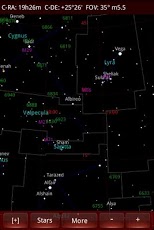
Sky Atlas is not planetarium or simulation software. It is designed analog to a paper atlas for the purpose of looking up sky positions of celestial objects. The electronic form takes advantage of zooming and selection of objects to be displayed or not -- possibilities which are not available to paper. The star chart is plotted on equatorial coordinates. Current horizontal positions, rise & set times, etc. for objects can be viewed after selection of an object of interest. A star chart can be saved to external memory card for documentation purposes, such as websites or blogs.
The use of Sky Atlas is believed to be simple, intuitive and largely self-explanatory, yet requiring basic knowledge of astronomy and familiarity with your Android phone.
Atlas Objects
Opens a list of object categories. Tap on a category to view available objects. Upon selection of an object, its data is shown in a message box, from which to return to selection of another object or choose to center an object on the star chart. Categories which contain a large number of objects are assigned a sub-menu (tap on screen's menu button) which allow to narrow down by various criteria dependent on the nature of the category.
* Constellations
* Named Stars
* Nearby Stars
* Binary Stars
* Variable Stars
* Exoplanets
* All Messier objects with images
* Bright deepsky objects with images
* All Caldwell objects with images
* Solar System Planets
* Dwarf Planets & Asteroids
* Comets
* Meteor Showers
* Hubble Objects
* Kepler Field Overlay
* Celestial Poles
References
This list of items is not directly related to the star chart, but to astronomical time-keeping, information and visualizations.
* Rise, set, twilight times
* Day & Night Visualization
* Planisphere
* Rectangular view of the sun's vicinity
* Earth Globe in 3D
* Moon Atlas in 3D
* Moon Calendar
* MSL Curiosity Station
* 3D planetary phase views
* Planetary Moons
* Spacecrafts
* Pleiades Close-up
* Solar Eclipses
* Greek Alphabet
* Glossary
* Historical Timeline
* Zodiacal Signs
* Martian Moons
* Plutonian Moons
Computing
This section is for astronomical computing, such as current positions of the Galilean moons, orbit simulation, calculation of optical equipment performance and more.
* Galilean Moons
* Orbit Simulator
* Distances among Stars
* Speed of Light Simulation
* Telescope Calculator
* Binocular Calculator
* CCD Imaging Calculator
* Optical Formulae
* JD-Date/Date-JD Converter
Star Chart
* Stars down to magnitude 6.4
* Constellation lines
* Constellation boundaries
* All Messier objects
* Bright NGC/IC objects
* All Caldwell objects
* Sun, moon and planets overlay
* Equatorial Grid
* Equator line
* Ecliptic line
* Associated object labels
* Color display
* Monochrome, negative display
* Nightview (red display)
Sky Atlas is designed only for Android phones operating in portrait mode. If you own a tablet please search for "Sky Atlas Tablet".
Galaxy Precident SCH-M828C and similarly small phones not supported.
ご購入をお考えのお客様へ、
本アプリーに関するご質問は日本語でもお受けしております。
お気軽にお問い合わせください。
About Sky Atlas
The company that develops Sky Atlas is Requio Web Design. The latest version released by its developer is 1.42.
To install Sky Atlas on your Android device, just click the green Continue To App button above to start the installation process. The app is listed on our website since 2016-09-10 and was downloaded 0 times. We have already checked if the download link is safe, however for your own protection we recommend that you scan the downloaded app with your antivirus. Your antivirus may detect the Sky Atlas as malware as malware if the download link to requio.com_nz177jp.seizu_seiza is broken.
How to install Sky Atlas on your Android device:
- Click on the Continue To App button on our website. This will redirect you to Google Play.
- Once the Sky Atlas is shown in the Google Play listing of your Android device, you can start its download and installation. Tap on the Install button located below the search bar and to the right of the app icon.
- A pop-up window with the permissions required by Sky Atlas will be shown. Click on Accept to continue the process.
- Sky Atlas will be downloaded onto your device, displaying a progress. Once the download completes, the installation will start and you'll get a notification after the installation is finished.
Program Details
System requirements
Download information
Pricing
Version History
version 1.42
posted on 2016-09-10
Ver 1.42: Science updates,Ver 1.41: Science updates,Ver 1.40: Science updates,Ver 1.39: GRS longitude updated, please set to 222 deg, science updates,Ver 1.38: Major asteroids added to the database, science updates,Ver 1.37: Planisphere can be enlarged, science updates,Ver 1.36: Better compatibility with hi-res phone screens and 7 inch tablets, science updates,Ver 1.35: Science updates,Ver 1.34: Adds all Caldwell object with images, science updates, online database update removed.
version 1.27
posted on 2013-06-27
Several fixes and updates
Disclaimer
External Download
We do not host Sky Atlas on our servers. We did not scan it for viruses, adware, spyware or other type of malware. This app is hosted by Galad and passed their terms and conditions to be listed there. We recommend caution when installing it.
The APK Download link for Sky Atlas is provided to you by apps112.com without any warranties, representations or guarantees of any kind, so access it at your own risk.
If you have questions regarding this particular app contact the publisher directly. For questions about the functionalities of apps112.com contact us.
